> For the complete documentation index, see [llms.txt](https://docs.stylothemes.com/llms.txt). Markdown versions of documentation pages are available by appending `.md` to page URLs; this page is available as [Markdown](https://docs.stylothemes.com/qalam/basic-setup/license-activation.md).
# License Activation
To unlock the full potential of the theme, you must activate your license key. Follow these steps to complete the activation process.
#### License Details
Your license key information is available in the License Keys tab on the website
#### How to Activate
To activate the license key, first, make sure that you have installed and activated the StyloCore plugin
Now, you will see a new tab on top of your WordPress admin dashboard. Click on this tab.
Now in the next screen, you need to provide the license key information along with your Order ID and Account Email (on our website)
Add the required information, and make sure there are no spaces or extra characters. After adding information in the input boxes, click on the **Save Settings** button.
{% hint style="warning" %}
You need to save the settings before attempting to activate the license key.
{% endhint %}
After saving the settings, click on the **Activate License** button. Your license key will be activated in a few seconds.
{% hint style="danger" %}
If the license key is not being activated:
* First, make sure that your server is not blocking outgoing requests to our server (stylothemes.com)
* Check if any cache or security plugins are blocking the Ajax Call.
* Disable non-theme-related plugins one by one to check if any third-party plugin is causing conflicts with the theme.
{% endhint %}
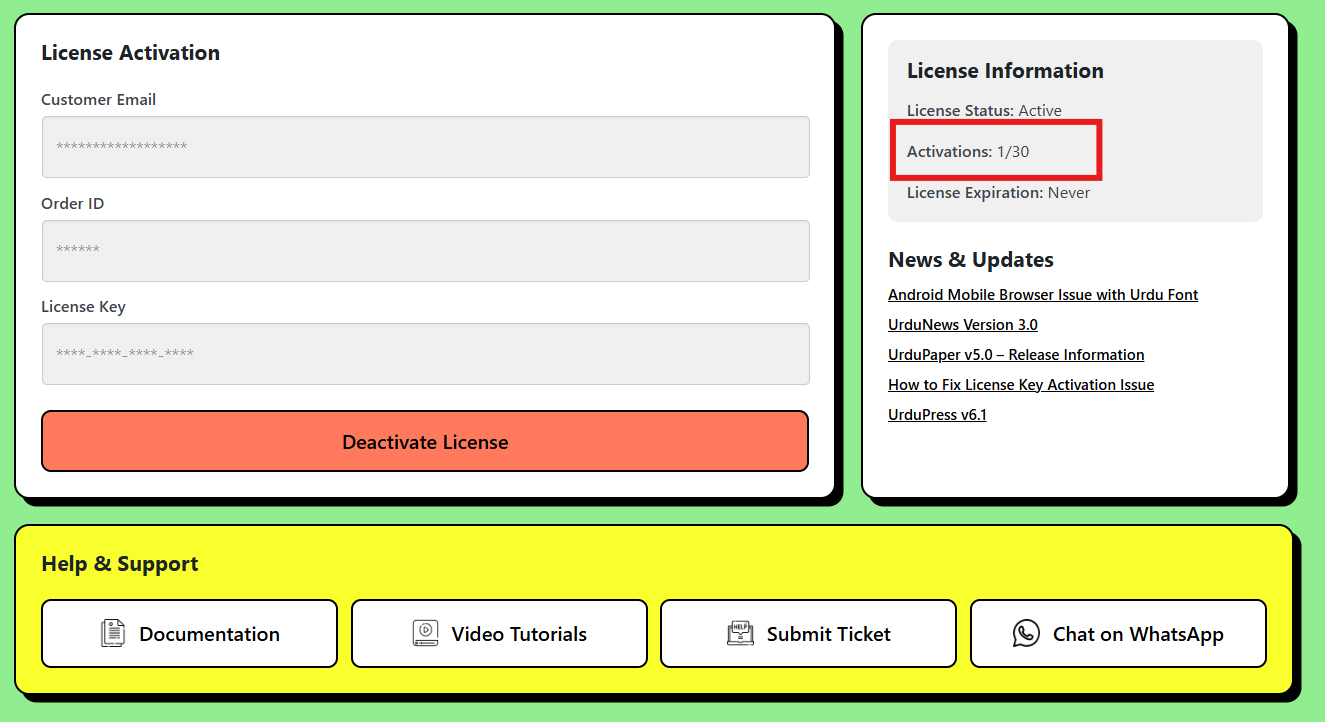
Once the license key is successfully activated, you will the updated license count on the right side, and your license data will be hidden in the admin screen.
{% hint style="warning" %}
If the license count or other details are not updating correctly, you can safely ignore it. This may occur due to technical reasons but does not impact the theme's functionality.
{% endhint %}