> For the complete documentation index, see [llms.txt](https://docs.stylothemes.com/llms.txt). Markdown versions of documentation pages are available by appending `.md` to page URLs; this page is available as [Markdown](https://docs.stylothemes.com/urdupaper/basic-setup/demo-import.md).
# Demo Import
This theme comes with a fully featured demo that you can import with just one click. Follow the steps below to import the demo data.
#### Demo Plugin
First, make sure that the One Click Demo Import plugin is installed and Activated
#### Demo Import
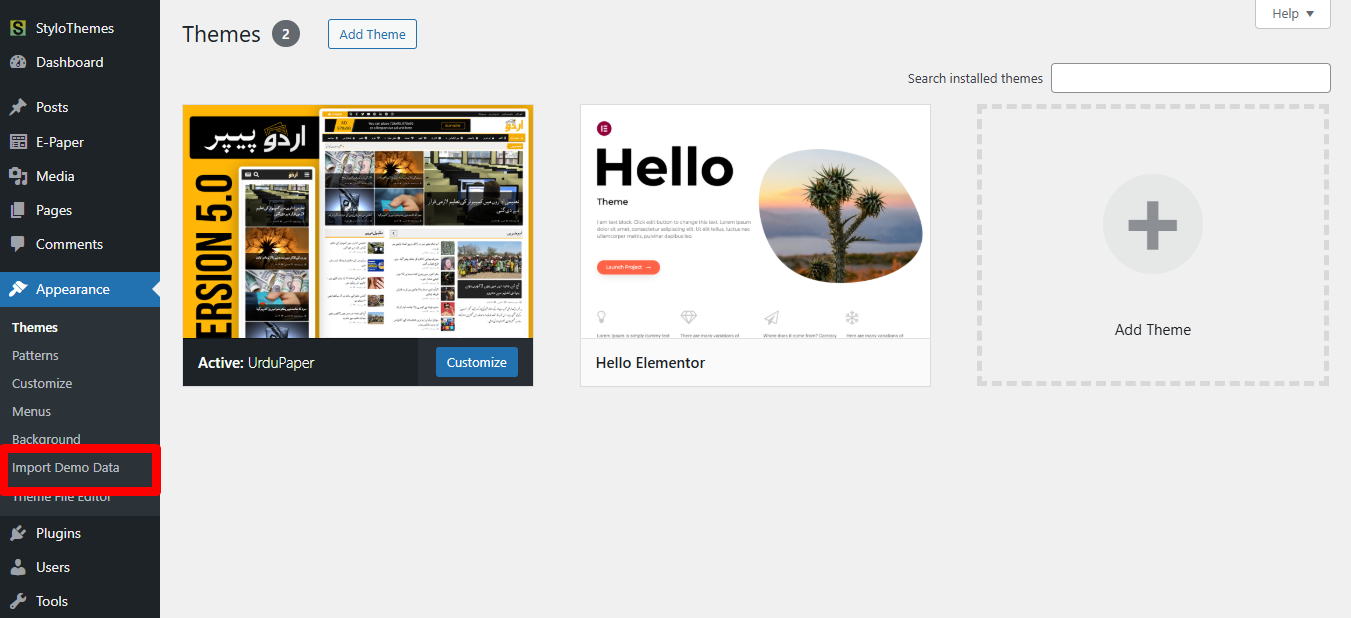
The link is available under the **Appearance** tab
On this page, click on Import Demo Data on the bottom-left section of the screen.
On the next screen, click on **Continue & Import** button
This will start the demo import process and it may take a few minutes to fully import the demo data. The speed varies on different servers.
After a few minutes, your demo will be imported. Please do not refresh or c lose the tab or the process will stop.
{% hint style="danger" %}
If the demo content import process is stuck, incomplete, or not working correctly, it likely means your hosting's PHP.ini limits are too low for the WordPress Importer. This prevents the demo data from being imported properly.
To resolve this, contact your web hosting support and request an increase in the following PHP.ini limits:
* **max\_execution\_time = 300** (600 recommended)
* **memory\_limit = 128M** (256M recommended)
* **post\_max\_size = 32M**
* **upload\_max\_filesize = 32M**
* **max\_input\_vars = 2000**
{% endhint %}