> For the complete documentation index, see [llms.txt](https://docs.stylothemes.com/llms.txt). Markdown versions of documentation pages are available by appending `.md` to page URLs; this page is available as [Markdown](https://docs.stylothemes.com/urdupress/basic-setup/installation.md).
# Installation
UrduPress is a premium WordPress theme built for Urdu news and blogs, offering native RTL support, elegant typography, and customizable layouts.
#### Prerequisites
* WordPress 5.2 or higher
* PHP 7.1 or higher
* MySQL 5.6 or higher
* Kirki Customizer Framework plugin
#### Installation
1. Navigate to **Appearance > Themes** tabs in your WordPress Admin Dashboard
2. Click on **Add New Theme** button on upper-left section \

3. Click on the Upload Theme button\

4. Now Drag or Choose the pinblog.zip file from your computer (that you have downloaded from your account on [StyloThemes](https://stylothemes.com/my-account))
> NOTE: If you are facing trouble while installing a theme from your WordPress dashboard, it is most likely due to a resource limit at your web hosting. In this case, there are 2 options for you.
1. Install theme from cPanel / File Manager
2. Ask your web hosting provider to change the following settings for your account:
* max\_upload\_limit = 32M
* max\_execution\_time = 300
* max\_post\_size = 32M
#### Activate Theme
After successful installation, Activate the theme.
#### Required Plugins
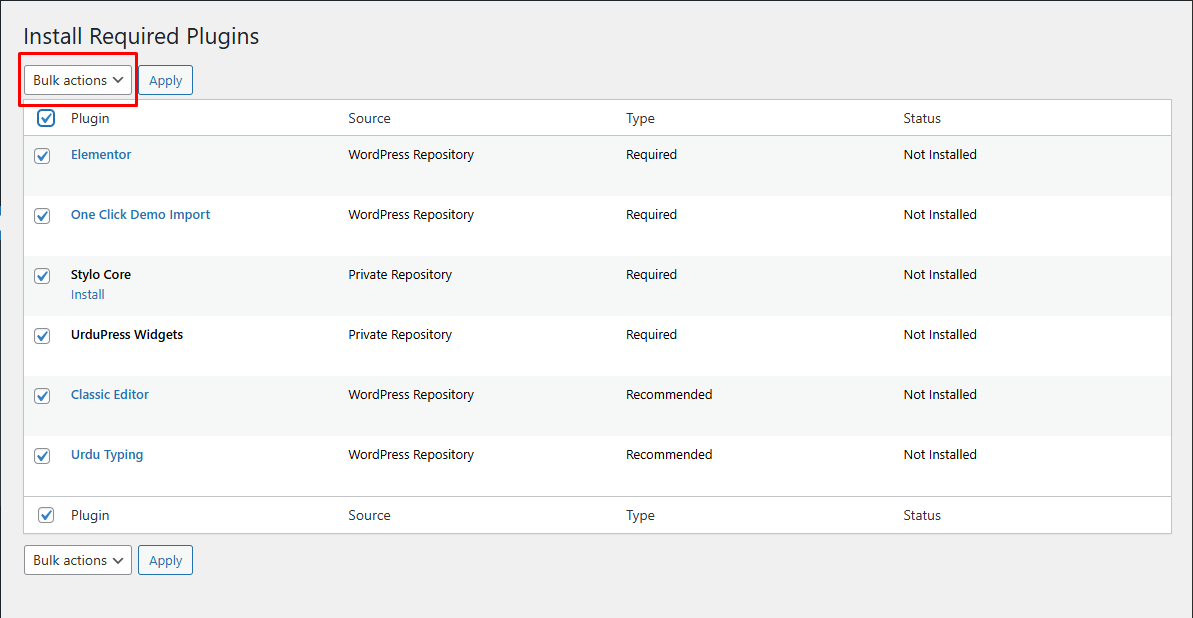
This theme requires several plugins to be installed and activated. Some of them are required and some are recommended. You may ignore the recommended plugins but the required plugins must be installed and activated.
Click on Begin installing plugins link in the notice
Check all the plugins and select the Install option from the **Bulk Actions** dropdown
After the plugins are installed, make sure they are activated by navigating to the Plugins tab. Activate them if they are not activated.