> For the complete documentation index, see [llms.txt](https://docs.stylothemes.com/llms.txt). Markdown versions of documentation pages are available by appending `.md` to page URLs; this page is available as [Markdown](https://docs.stylothemes.com/urdupress-lite/elementor/widgets/classic.md).
# Classic
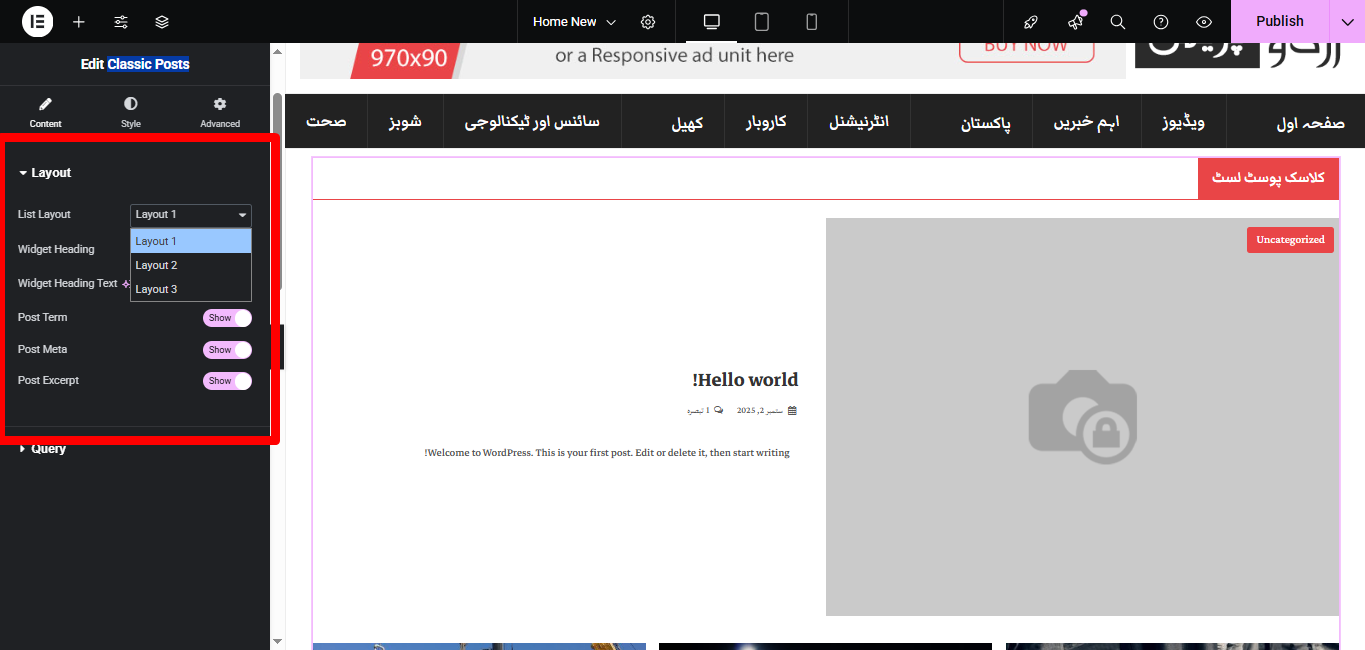
The Classic Posts widget lets you display blog posts in a traditional blog-style layout. It includes multiple layout presets, with control over post meta, terms, excerpts, and headings
### 🔹 Content Tab
#### **Layout**
* **Layout**\
Choose from **3 predefined layouts** to display your posts in a classic style.
* **Widget Heading**
* *Show/Hide*: Toggle the section heading on or off.
* *Widget Heading Text*: Enter custom text for the widget heading.
* **Post Term**
* Show or hide post categories/taxonomies above the post title.
* **Post Meta**
* Show or hide meta information such as author, date, and comments.
* **Post Excerpt**
* Show or hide excerpts.
* Excerpt length is adjustable.
***
#### **Query**
* **Source**\
Select the source of posts (Posts, Pages, or Custom Post Types).
* **Include/Exclude By**\
Filter by Category, Tags, or specific Post IDs.
* **Posts Per Page**\
Set how many posts to display at once.
* **Order By**\
Choose how posts are sorted (`Date`, `Title`, `Random`, etc.).
* **Order**\
Ascending (ASC) or Descending (DESC).
* **Offset**\
Skip a defined number of posts.
***
### 🔹 Style Tab
#### **Heading**
* Typography: font family, size, weight, letter spacing.
* Text color and alignment.
#### **Post Title**
* Normal & Hover Colors.
* Typography controls (size, weight, line height, etc.).
#### **Post Term**
* Text color and background color.
* Border radius for pill-style look.
* Typography options.
#### **Post Meta**
* Control colors for icons and text.
* Hover color settings.
* Typography adjustments.
#### **Excerpt**
* Color customization.
* Typography controls (size, spacing, weight).
#### **Spacing**
* Adjust padding, margins, and column spacing between posts.
***
✅ With the **Classic Posts** widget, you can create a timeless blog layout, blending typography, meta info, and excerpts for maximum readability.