> For the complete documentation index, see [llms.txt](https://docs.stylothemes.com/llms.txt). Markdown versions of documentation pages are available by appending `.md` to page URLs; this page is available as [Markdown](https://docs.stylothemes.com/urdupress-lite/elementor/widgets/posts-grid.md).
# Posts Grid
Display posts in a responsive grid with 7 preset layouts and 3 overlay styles. Control exactly which posts appear (by post type, category, tags, etc.) and fine-tune the design in the Style tab.
### Add & Configure
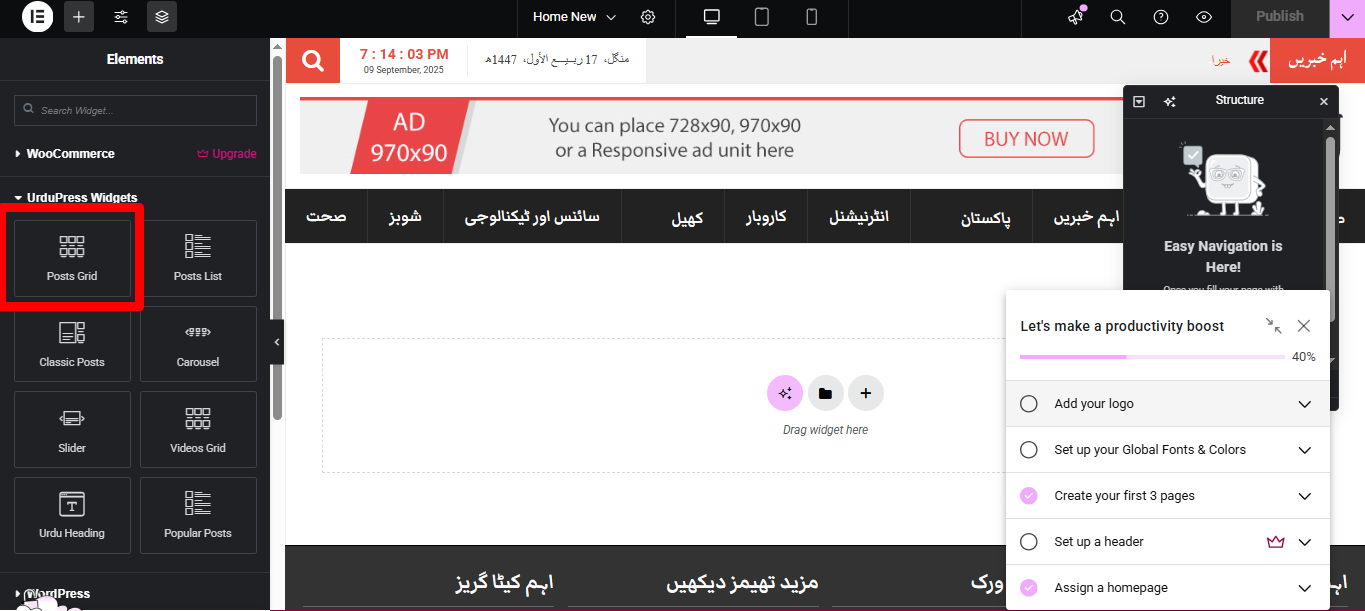
1. Open the page with **Elementor** and search for **Post Grid**.
2. Drag it onto the canvas.
3. Use the **Content** tab to choose a **Grid Layout**, **Overlay Layout**, and what to show (heading, terms, meta, icon, full-card link).
4. Open **Query** to choose **source**, **categories/tags**, **posts per page**, **sorting**, and **offset**.
5. Use the **Style** tab to design spacing, colors, typography, overlay, badges, etc.
6. Click **Update** to save.
### Content Tab
#### Layout
* **Grid Layout**\
Choose one of **7** grid presets (e.g., different image/text arrangements, card styles, and gutters).
* **Overlay Layout**\
Choose one of **3** overlay styles (e.g., *Title Only* plus two additional variants).
* **Widget Heading** *(Show/Hide)*\
Toggle a section heading above the grid.
* **Widget Heading Text**\
Text used when **Widget Heading** is enabled.
* **Overlay Icon** *(Show/Hide)*\
Show an icon on image hover (e.g., play/eye icon depending on use).
* **Post Term** *(Show/Hide)*\
Show the category/tag badge on each card.
* **Post Meta** *(Show/Hide)*\
Show meta such as date, author, views, or comments (depending on theme settings).
* **Full Grid Link** *(On/Off)*\
Make the **entire card** clickable (links to the single post).
> ℹ️ Available toggles/positions can vary slightly by chosen **Grid Layout** and **Overlay Layout**.
***
#### Query
Control which posts appear in the grid.
* **Source (Post Type)** – Select the type (e.g., *Posts*, *Videos* CPT).
* **Categories** – Filter by one or more categories.
* **Tags** – Filter by one or more tags.
* **Posts Per Page** – Total items to show in the grid.
* **Order By** – Date, Title, ID, Menu Order, Random, etc.
* **Order** – Ascending / Descending.
* **Offset** – Skip the first *n* posts (useful to avoid duplicates across sections).
> 💡 Combine **Categories/Tags** with **Offset** to build multi-block homepages without repeating the same posts.
***
### Style Tab
> The exact sections shown depend on the selected **Grid Layout** and **Overlay Layout**. Common controls include:
* **Grid** – Columns (desktop/tablet/mobile), row/column gap, card spacing.
* **Card** – Background, border, radius, shadow, inner padding.
* **Image** – Ratio, fit/position, hover scale, overlay color & opacity.
* **Overlay** – Background, padding, alignment; title/meta visibility & spacing.
* **Title** – Typography, color, hover color, spacing, line-clamp (if available).
* **Meta** – Typography, color, icon size/space, separator.
* **Term Badge** – Typography, text/bg color, radius, padding, position.
* **Heading (Widget Heading)** – Typography, alignment, divider/spacing.
* **Read-More / Full-Card Link** – Typography and colors (shown only when the layout uses it).
***
### Tips & Best Practices
* **Pick the layout first**, then style—some style controls are layout-specific.
* Use **Full Grid Link** for better click targets on mobile.
* Keep **meta** subtle so titles remain the main focus.
* For visual balance, set consistent **image ratios** across sections.
* Use **Offset** to prevent duplicate posts if you’re stacking multiple grids on the same page.
***
### FAQ
**Why don’t I see some Style controls?**\
Certain options only appear with specific **Grid** / **Overlay** combinations.
**Can I show only videos?**\
Yes—set **Source** to your **Videos** CPT in the **Query** panel.
**How do I change the overlay text/content?**\
Choose a different **Overlay Layout** (Content → Layout). Then style it under **Style → Overlay/Title/Meta**.